Logging is a chore.
Walpat makes it nearly automatic — scan a receipt, paste a bank SMS, let Apple Pay payments log themselves, or just tell Siri.
 Budgeting for iPhone · No account needed
 Walpat turns your budget into a simple daily pace. Log spending in seconds — by receipt, text message, Apple Pay, Siri or a tap on your Home Screen — and see whether you're on track, what you can safely spend today, and where your money really goes.
*No account. No bank login. Just your budget.
You set limits at the start of the month, life gets busy, the logging stops, and by the time you look again the money's gone. Walpat fixes the two things that break budgets.
Walpat makes it nearly automatic — scan a receipt, paste a bank SMS, let Apple Pay payments log themselves, or just tell Siri.
Walpat measures your pace. It compares what you've spent with where you should be at this point in your cycle, and tells you in plain words.
Pick your currency, how often your budget resets — weekly, monthly or fully custom, like the 25th to match payday — and give each category a limit. Takes about a minute.
Add expenses and income by hand, by scanning, by sharing, by voice, or automatically from SMS and Apple Pay.
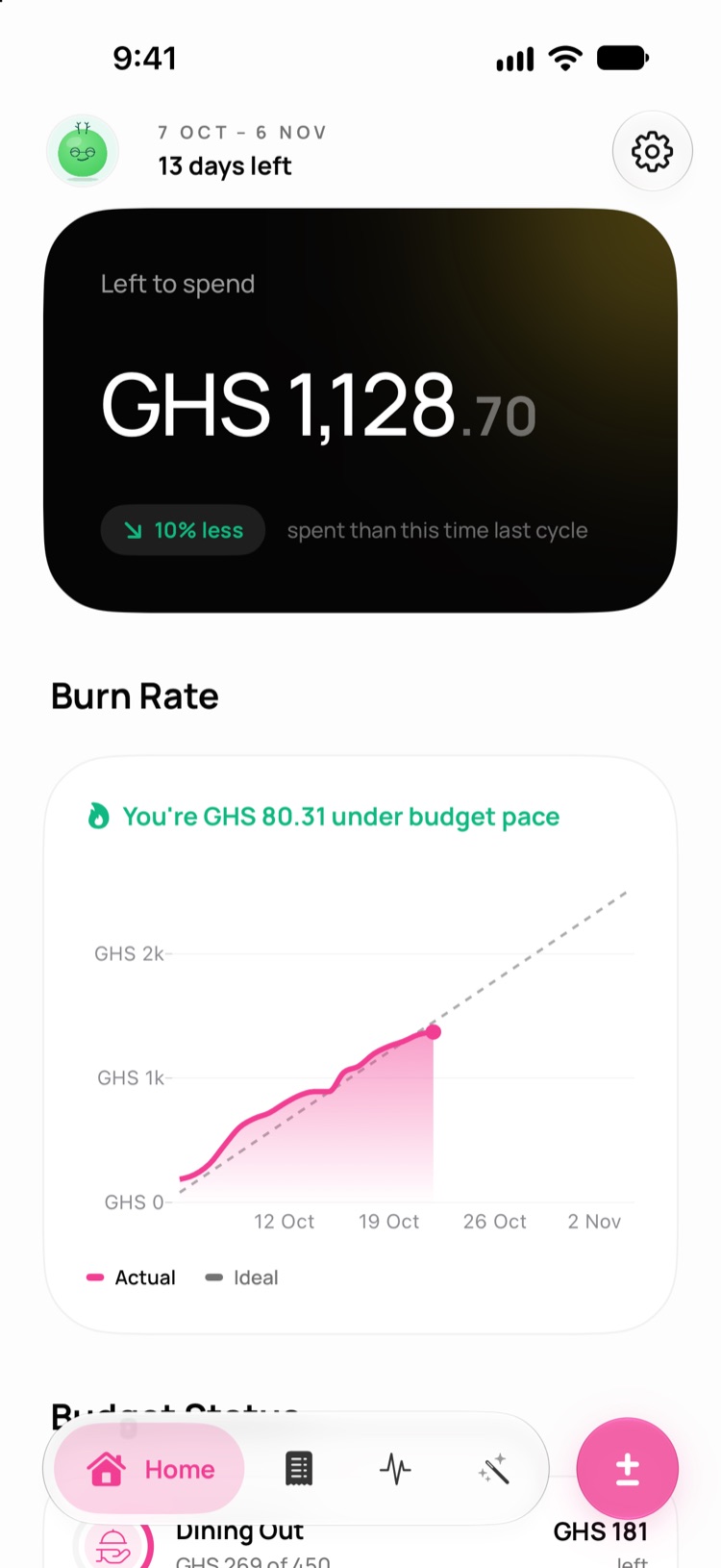
Home shows what's left, how fast you're burning through it, and a daily amount that keeps you on track.
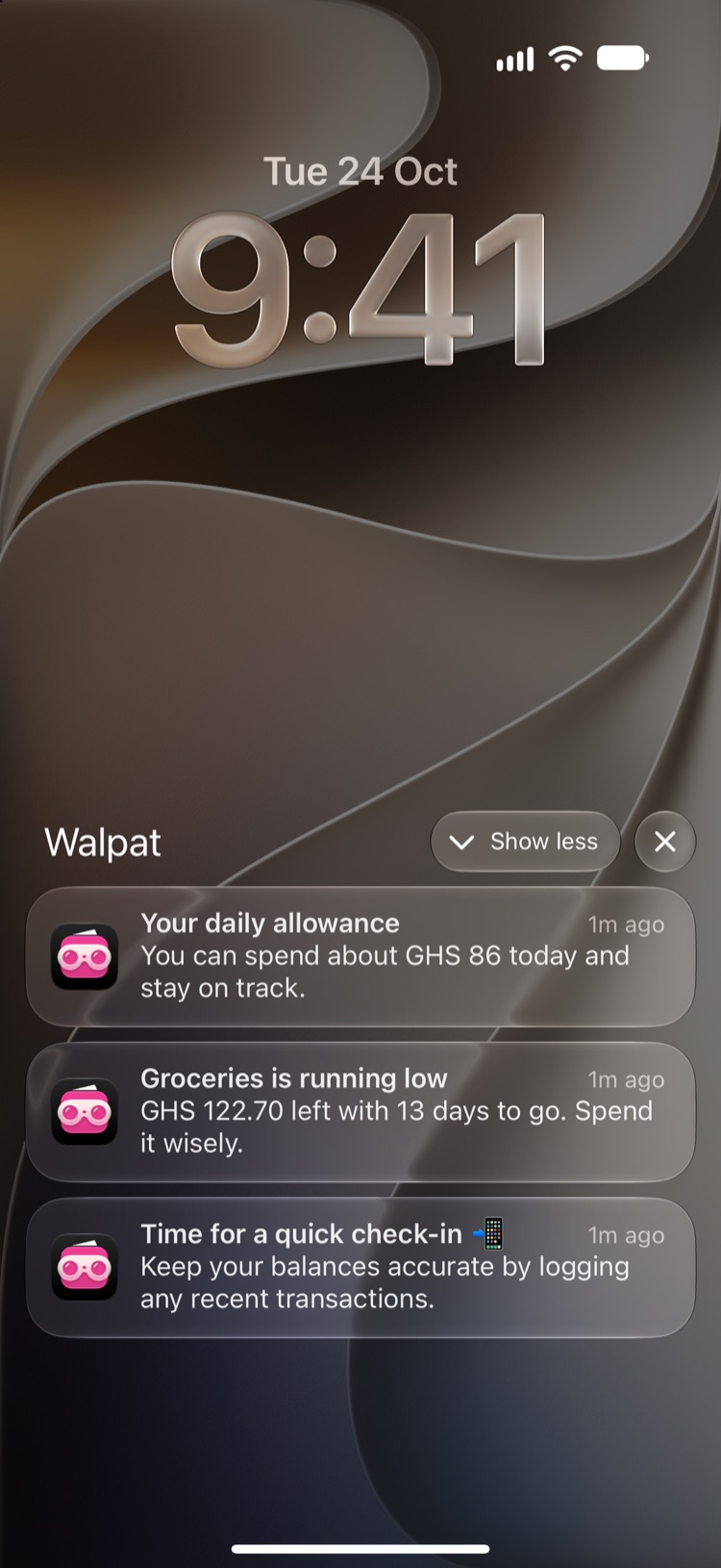
Reminders at times you choose, with something useful to say — a bill that's usually due, a category near its limit, or what's safe to spend today.
Home shows your balance, every category limit, and a Burn Rate chart of your actual spending against your budget line — with plain-language status and a daily number to stay under.
You're GHS 80 under budget pace
Walpat is built around budget cycles. At the end of each one, spending resets, your full budget is refreshed and the finished cycle is saved so you can compare over time.
Receipts, bank texts, Apple Pay, Siri, widgets — Walpat meets your spending where it happens.
Point your camera at a receipt, pick a screenshot, or paste a bank text. Walpat pulls out the amount, date, merchant and category — even a whole statement at once — and spots ones you've already logged.
Free: 3 scans per cycle · Pro: unlimited
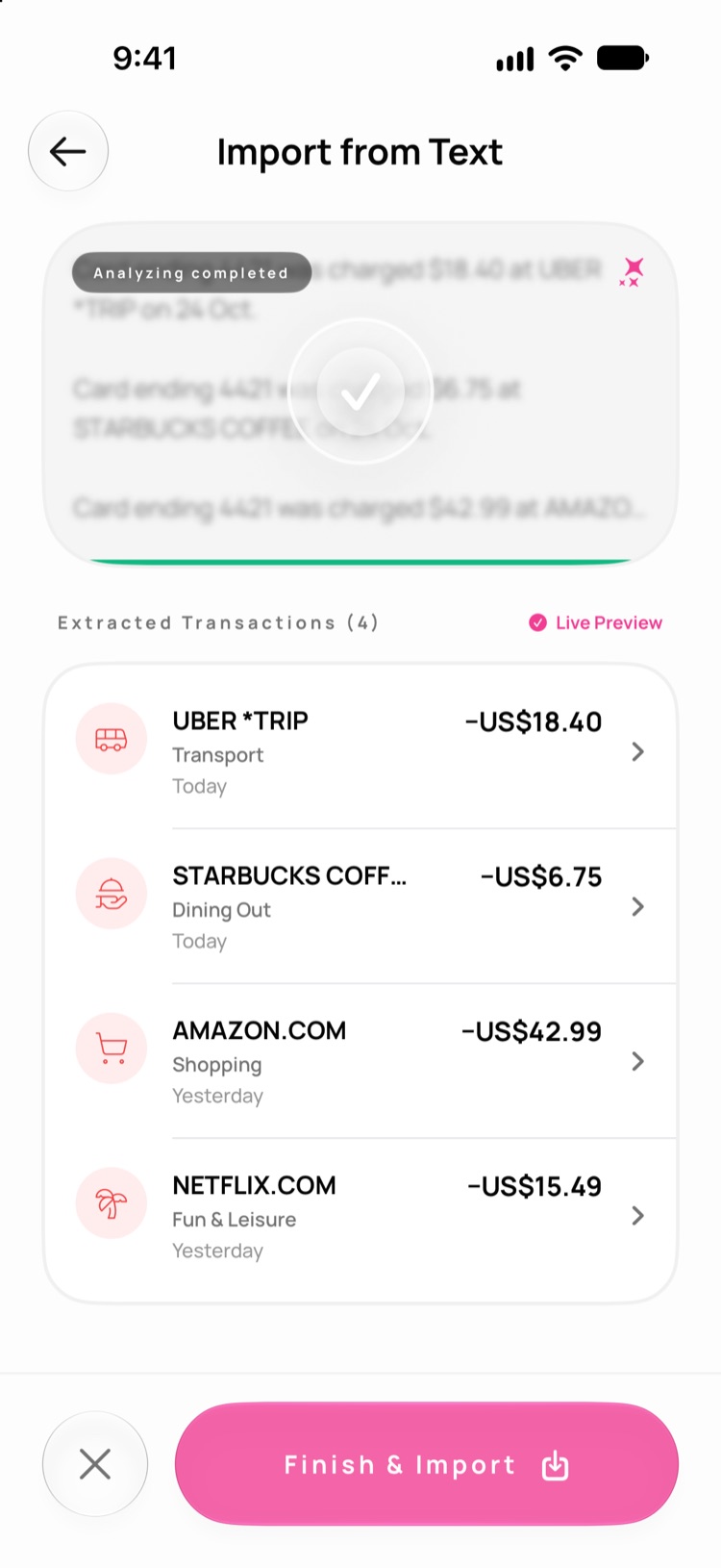
A private iOS Shortcuts automation you set up once. Bank texts and tap-to-pay purchases log themselves — a guide with a setup video walks you through it.
SMS reading needs Apple Intelligence · Apple Pay tracking needs iOS 27
Just ask. Siri learns your own category names, so you can name one and skip the question.
In Photos or your banking app, tap Share and pick Walpat to log a payment in one go.
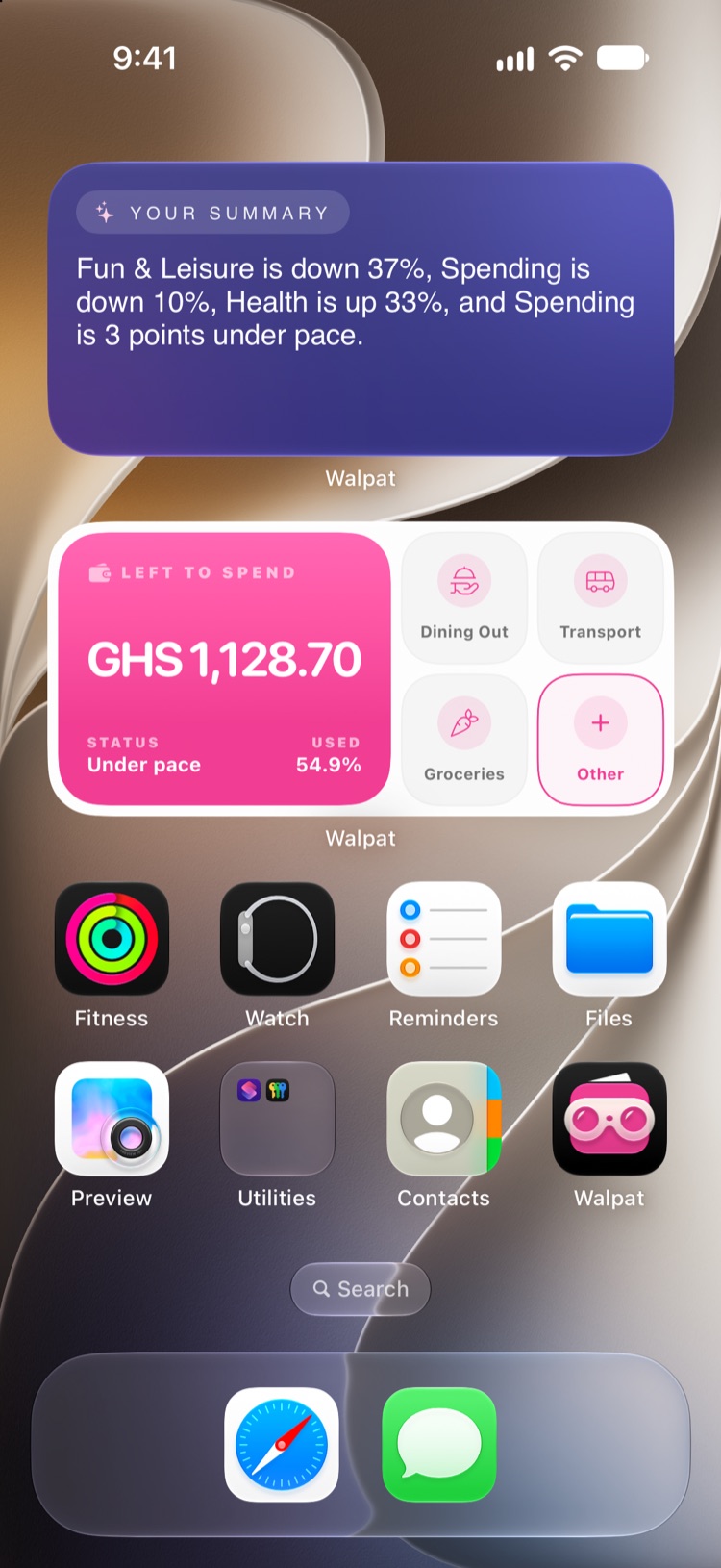
A Log Expense control in Control Center and on the Lock Screen. Press and hold the app icon for Add Expense, Add Income or Scan Receipt. Interactive widgets that log in one tap.
Scan Receipt appears on iPhones with Apple Intelligence
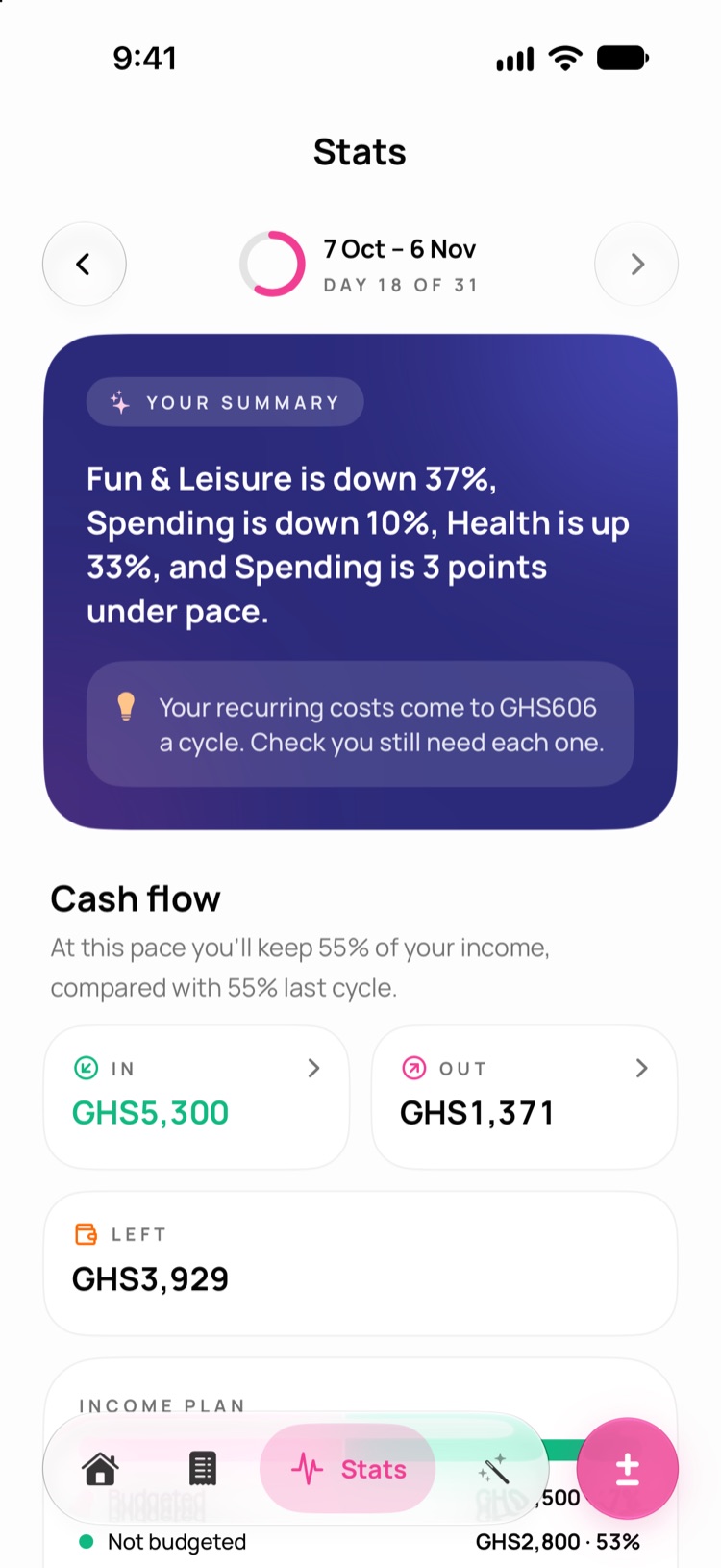
The Stats tab turns your cycle into clear, readable cards.
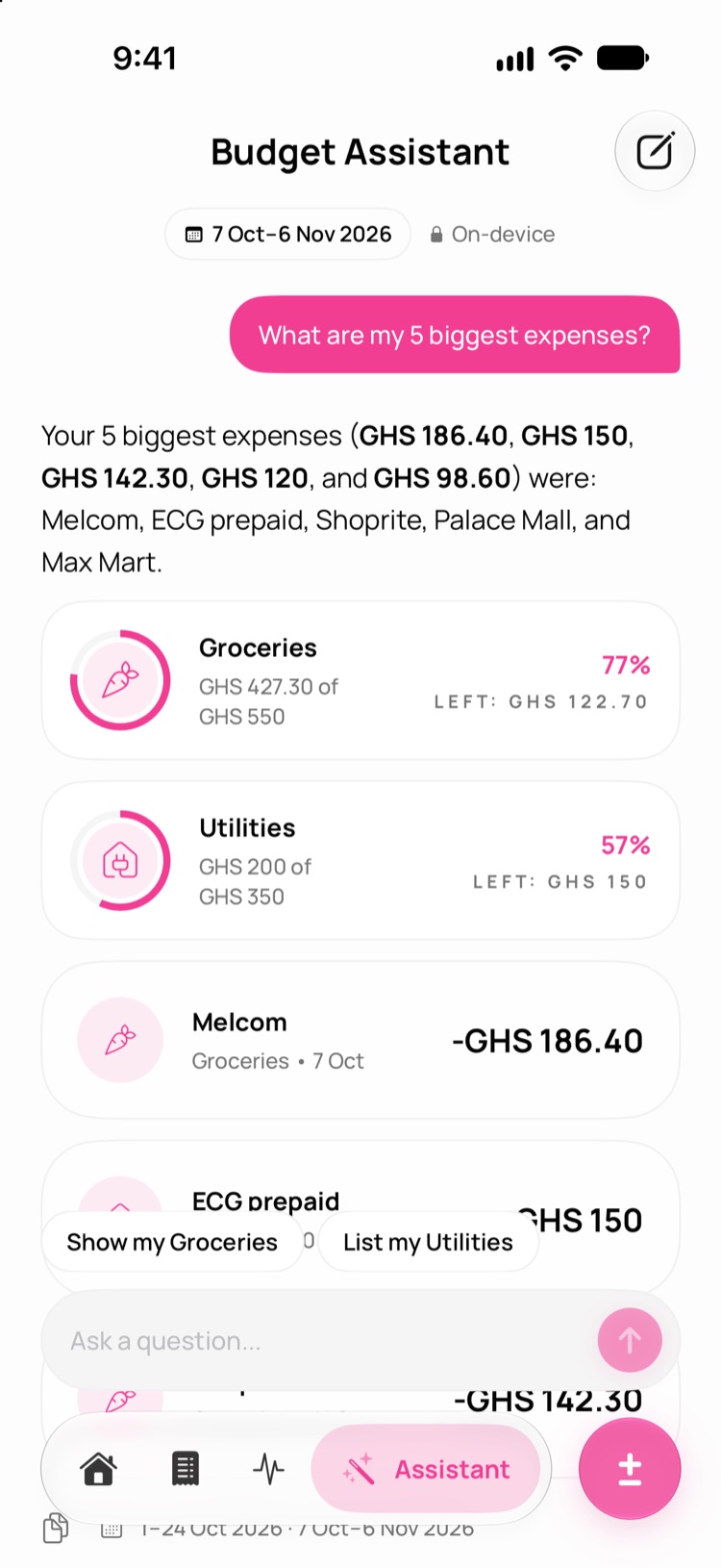
Chat with an assistant that knows your budget — and only your budget.
Answers come from your own transactions and show the categories and transactions they're based on, plus the dates they looked at — so a wrong period is easy to spot. Suggested follow-ups help you dig deeper.
Pick the times of day you want to hear from Walpat. Each reminder is chosen from your real numbers, so it's worth reading.
Every reminder has a Log expense button that opens straight to the right category. On supported iPhones, Apple Intelligence writes the wording on-device. Walpat never sends the same nudge twice in a row.
Check your pace without opening the app — and log an expense with a single tap.
Choose from all common world currencies when you set up. Walpat uses live exchange rates to convert amounts, and formats every figure in your own currency.
Live exchange ratesMatch your iPhone or pick a look, choose a Pink or Orange accent with a matching app icon, and name, colour and icon your own categories. Try it — this page follows along.
No accounts. No bank logins. No cloud chatbot reading your spending.
Open the app and start budgeting.
Walpat never asks for your banking password.
Transactions and settings sync through your private iCloud, so they move with you to a new iPhone.
Smart Import, the assistant, summaries and nudges use Apple Intelligence on-device.
Walpat can't read your texts. SMS tracking works through a Shortcuts automation you control.
Anonymous usage data is only shared if you say yes. No ad tracking, ever.
Everything you need to budget is free. Walpat Pro adds automatic tracking, the AI assistant, full insights and unlimited scans.
Budgets, pace, widgets, Siri, nudges and 3 Smart Import scans every cycle.
Starts with a 1-week free trial for new subscribers. Cancel anytime in your Apple ID settings.
Pay once, Pro forever. Every Pro feature, now and in future updates.
| Feature | Free | Pro |
|---|---|---|
| Budget cycles, categories and limits | Included | Included |
| Home, Burn Rate and daily pace | Included | Included |
| Manual logging, Siri, widgets, Share to Walpat | Included | Included |
| Smart nudges | Included | Included |
| Budget pace and vs last cycle insights | Included | Included |
| Smart Import scans | 3 per cycle | Unlimited |
| Automatic tracking with Apple Pay and SMS | Not included | Included |
| Ask Walpat AI assistant | Not included | Included |
| Full insights — In vs out, When you spend, Looks recurring, income | Not included | Included |
| Past cycle history | Not included | Included |
Prices vary by country and region — you'll see the price in your local currency in the App Store before you buy. Purchases are handled by Apple and can be restored on any device signed in to the same Apple ID.
Can't find what you need? Email us.
Connect your bank for automatic syncing.
No. Walpat works without sign-up. Your data is stored on your iPhone and synced through your own iCloud.
Not today. You log with receipts, texts, Apple Pay automation, Siri or by hand. Bank sync is on the way.
No — iOS doesn't allow it. Instead, you set up a Shortcuts automation that sends bank alerts to Walpat when they arrive. You stay in control and can turn it off anytime.
A Shortcuts automation runs whenever you pay with Wallet and logs the payment in Walpat. The in-app guide walks you through setup in a few steps. (Pro)
Smart Import, SMS tracking, the assistant, written summaries and AI-written nudges need iOS 27 on an iPhone that supports Apple Intelligence, with Apple Intelligence turned on. Apple Pay tracking needs iOS 27. Everything else — budgets, pace, widgets, Siri, nudges, insights — works on any iPhone running iOS 18.6 or later.
A fixed period — usually a month — where you track spending against your category limits. When it ends, spending resets and the cycle is saved to your history.
Yes. Set a custom cycle on any day of the month, any weekday, the last day of the month, or every few days or weeks.
All common world currencies. Walpat uses up-to-date exchange rates for conversions.
Sign in to the same iCloud account and your budget, transactions and settings come back. Restore your Pro purchase from the paywall.
3 Smart Import scans per budget cycle. They reset when a new cycle starts. Pro is unlimited.
In the App Store: Settings → your name → Subscriptions → Walpat. Cancel before the trial ends and you won't be charged.
Download Walpat free. Set your cycle in about a minute — no account, no bank login.